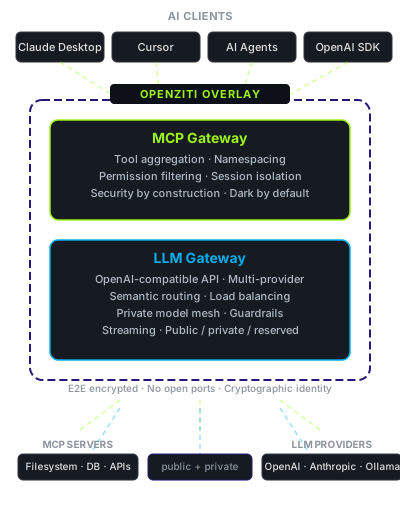
MCP Gateway + LLM Gateway. Identity-First Connectivity™ for AI.
AI tools need access to internal resources, models, and APIs. Traditional approaches force a choice between security and velocity. These gateways eliminate that tradeoff.
Two open source gateways built on OpenZiti. Route AI clients to tools and models through an encrypted overlay with cryptographic identity, end-to-end encryption, no shared API keys, no open ports, and no VPN.
One identity, one security model
Both gateways are built on OpenZiti and share the same zero-trust foundation. They work independently, but they're designed to work together.
Unified identity
A single OpenZiti identity gives an agent access to specific LLM models and specific MCP tools. No separate credentials for each system.
Correlated observability
Trace a request from agent through LLM call to tool invocation and back. See the full picture of what your AI workflows are doing.
Coordinated governance
Consistent policies across model access and tool access. Same identity model, same enforcement approach, same audit trail.
MCP Gateway
Zero-trust access to MCP tool servers from Claude Desktop, Cursor, VS Code, and any MCP-compatible client.
One-command setup
Wrap any MCP server with a single mcp-bridge command. No code changes to your server.
Multi-backend aggregation
Combine local stdio servers and remote zrok shares into a single connection for your client.
Tool namespacing
Your clients see a clean, unified toolset regardless of how many backends you run. Tools are namespaced automatically - no collisions, no manual prefixing.
Security by construction
Permission filtering removes tools from the registry entirely. Not checked at runtime - gone from the schema.
Session isolation
Each client gets dedicated backend connections. One client's crash or misbehavior never affects another.
Dark by default
No listening ports. Nothing to scan, nothing to probe. If you're not authorized, the service doesn't exist.
Consistent streaming behavior whether you're hitting OpenAI, Ollama, or anything in between. Three deployment modes: public, private, and reserved shares.
# Point it at your providersproviders:
open_ai:
api_key: "${OPENAI_API_KEY}"anthropic:
api_key: "${ANTHROPIC_API_KEY}"bedrock:
region: "us-east-1"profile: "default"ollama:
base_url: "http://localhost:11434"
Both projects are Apache 2.0, written in Go, and ship as single binaries with no runtime dependencies. They work with the tools you already use - no code changes, no new SDKs, no workflow disruption.
Get started
The fastest path to hands-on:
Try the LLM Gateway with a local Ollama
go install github.com/openziti/llm-gateway/cmd/llm-gateway@latest
Create a config pointing at your local Ollama and run it. Any OpenAI-compatible client can talk to it. Takes about two minutes.
zrok provides a user experience layer for OpenZiti. It handles network configuration, identity provisioning, and share management automatically - so both gateways can offer encrypted, identity-based connectivity without impacting velocity.
Use zrok.io
Free hosted zrok service from NetFoundry. Create an account and start sharing in minutes.